Showing posts with label tools to assist with PCMH recognition. Show all posts

Monday, December 3, 2012

Managing Your PCMH Project Tools with Panache


If you’ve considered getting your practice recognized as a Patient-Centered Medical Home, you’ve no doubt taken a look at the standards. There are several programs you could consider to get your practice PCMH "certified," and they all have some benefits, but for today, let’s talk about the National Committee on Quality Assurance’s (NCQA) PCMH program.

Of course, maybe we steer the conversation in that direction because that’s the one we happen to have built a tool around. (That always helps.) But we are fairly unbiased when it comes to how your practice chooses to get recognized. In fact, we are building PCMH tools that will work with whatever program you’re using for certification.

PCMH Recognition

Back to NCQA, if you’ve taken some time to look over this program, you’ll see there are 6 Standards, with 28 Elements (6 of which are must-pass), with nearly 150 sub-factors, some of which are considered critical factors. And NCQA is a documentation-based system. That means each of these subfactors require documentation to prove that you’re actually doing them. In fact, some factors will require more than one document! You can do the math and determine that's a lot of documentation. It's enough to make a busy practice manager head for the hills.

Although there can be a lot of work involved in getting recognized as a PCMH, it is do-able. And it doesn’t mean shutting down your practice to get it done.

In fact, it’s just the opposite.

PCMH is about building relationship with patients, not wasting time you don’t have on one more administrative burden.

That’s why we built the BizMed Online PCMH Tool. It’s sort of like a PCMH Project Manager, Documentation Development Tool, Documentation Storage Unit, and PCMH Score Tracker all in one!

The best news of all? It’s absolutely free.

Getting Started


After you’re done with that, it’s a good idea to take the PCMH Express Assessment.

Then you’re ready to get started.

PCMH Score Tracking

When you go through the tool you’ll notice that the Toolbox will display your practice name. Underneath your practice names you can see the tools available to you by clicking on the triangle. There you will see we’ve included NCQA Requirements you can review as you go through the process. There are also free examples of documentation you can use for your practice as well.

BizMed PCMH Project Manager software screenshot showing how to use the score tracking feature


Do you see how the Summary Status Report provides the practice with a score and includes a status bar at the top of the screen? That’s because this practice has gone through each element and indicated which documents it would be providing. The system then tracks what documents have been uploaded and keeps the practices updated on its’ progress.

This is a handy report you can use if you need to update external entities about your progress. Simply click on “Print Summary” to have a copy ready to share with others or to create a PDF version of the report to keep in your files (A copy will be automatically saved to your PCMH documents toolbox).

A guide to Patient-Centered Medical Home recognition


Click on each tab, beginning with PCMH1 and expand each element to review the sub-factors and odd documentation.

A screenshot from the BizMed toolbox


In the “present” column, you can select Yes/No/NA for each factor your practice is choosing to address. Remember, you don’t have to do each of these factors to receive NCQA recognition.
You need all 6 Must Pass Factors (1A, 2D, 3C, 4A, 5B, and 6C), and then you need the following points to receive Level 1, Level 2, or the highest Level 3 recognition:

  • Level 1 recognition:              35 – 59 points (plus all 6 must-pass elements)
  • Level 2 recognition:              60 – 84 points (plus all 6 must-pass elements)
  • Level 3 recognition:              85 – 100 points (plus all 6 must-pass elements)


We encourage you to go through the tool, element by element, to consider which items you’re doing already, and then go back to the Summary screen to see where you’re at on the Must Pass elements and the overall score. If you like what you see, then you can begin on preparing documentation. If you’d like to achieve a higher score, then consider what areas you’d like to focus on.

Any time you’re going through the BizMed PCMH Application Tool and you’ve forgotten the NCQA requirements, simply click on the “info” icon to the left of the element name and the document will open in a new browser tab.

Software to help primary care practices get recognized as a patient-centered medical home


You can also add Evaluation Notes for NCQA for each Element by clicking on the comment “Note” icon next to the Element Title. When content is added to an evaluation note, the icon changes color from gray to blue.

Add notes to your PCMH tool.


The application will automatically calculate your score for the Element based on the NCQA rules and weights. Please note that most often Factors are weighted differently. Refer to the NCQA documentation for explanatiosn of the calucation algorithms.

The BizMed PCMH tool has an automatic score update


In the adjacent 5 columns you can estimate the number of individual documents required to substantiate the Factor is present. There are 5 document types available: Policies, Reports, Screenshots, Logs/Tools, and Other. Your estimate is entered in the “Req.” (required) column for each.

The BizMed PCMH tool allows you to categorize and track your documentation


Creating a PCMH Baseline Assessment

Once you’ve done this for each of the elements, we encourage you to click on "Print Summary" or "Print with Details" which will save a copy of your Summary Status Report as a Baseline Assessment in your documents folder. Why? Having a baseline can be critical for showing progress made in the practice. Throughout the project you may add additional PCMH features to your practice. Having something to go back to to demonstrate progress can be very helpful!

This screenshot shows how the user clicks "print" and a copy is saved in the user's folder.


PCMH Documentation – Getting it Done!

You can now begin to upload the required cocuemntation by clicking on the blue round icon on the right of each row. A popup will display allowing you to select a document to upload. Make sure you select the correct document type from the drop-down menu!

Uploading your PCMH documentation is easy.


You may also designate if the document you are uploading is Primary, Secondary, or just Supporting. You may select certain pages and rename the document if needed. Close the Upload screen when you’re finished.

If you have one document that works for several factors, you only have to upload it once! You can choose to link an already uploaded document to other factors.

The screen will update to reflect the number of documents uploaded. Please note that if the number of documents uploaded (or linked) is not sufficint to satisfy the requirements, the cell will light up in yellow.
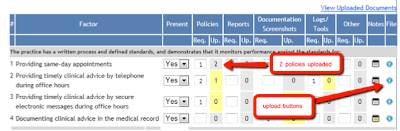
The tool tracks which documents have been uploaded


To view uploaded documents for your elements, click on the “Vew Uploaded Documents” link.
A popup screen will display listing all documents linked to this element.

You can view uploaded documentation by clicking here.


You can also add private Notes to each factor to share with others or for your own use. Simply click on the notepad icon.

If you’re working with a consultant or facilitator, you can allow them access to review your completed application. A section for reviewer notes have been included along with a checkbox for them to mark when the element is complete.

An external reviewer can add notes in this section


Sometimes you’ll notice a “Note” icon appear next to a Factor. This means that NCQA has REQUIRED additional information. Click on the note to add the necessary information. The icon will change color to indicate that content has been added.

The system alerts you when some notes are required by NCQA


This red box indicates that NCQA requires a note to be filled out here.


While the Summary tab provides you with an overall view of practice progress, the “NCA Submission” folder on the left displays all the documentation accumulated so far, including all Notes. This is where you can delete uploaded documents by clicking the red “X” next to the document name. Please note, this action cannot be undone.

You can print summary and detail status reports from the Summary page at any time. A copy will always be saved to your PCMH Documents folder for your records.

A picture of fireworks and the words, "BizMed's PCMH Tool is free for your practice - celebrate!"


There you have it. There may not be any free lunches in this world, but at least you can use this free PCMH Application!

Sunday, October 21, 2012

Why You Might Want to Become a PCMH

Check out this new video from the perspective of a Level III Patient-Centered Medical Home practice, Dr. James Barr.


Dr. Barr describes how PCMH lowers cost and improves quality of care for your patients.

View the video here: Transitioning Your Practice to the Patient-Centered Medical Home.

Monday, October 8, 2012

How to Measure Patient Cycle Time


Happiness is important, especially when it applies to your patients and your staff. With those two groups content the way is paved for providers to enjoy life a little more as well. The trifecta of happiness. It’s a good goal.
Believe it or not, there is one measure that's been linked to greater satisfaction scores for all three groups, patient cycle time. The only way to know yours is to measure it. 


Measuring Patient Cycle Time by BizMed

Cycle Time

Patient cycle time refers to the time included in an office visit, beginning the minute the patient arrives for the appointment and ending when they walk out the door.
Having a cycle time over an hour is one metric that seems to be connected to lowered patient, staff, and physician satisfaction. That means it’s something you’ll want to avoid. We’ll be providing another blog post soon with tips on reducing patient cycle time, but for now let's stick to how to measure it.

What to Measure

There could be many reasons why your cycle time may be longer than you'd like. Maybe patients are arriving late. Maybe the front desk is getting behind logging patients in. Maybe exam rooms are not adequately stocked and staff are searching from one place to the next for materials to handout to patients or tools to complete exams. 
The thing is, you won't know what is causing your backlog unless you measure your patient flow. Consider some of the following elements you can measure as part of a Patient Cycle Time Assessment.
  • Patient appointment time
  • Patient check-in time
  • Patient exam room check-in time
  • Provider enters the room time
  • Patient leaves the exam room time
  • Check-out time
You can add more or remove items from this list, depending on how long you want the assessment to take. 

How to Measure

There are some easy ways to measure cycle time for your practice. Here’s an example of one process:
  1. Be sure to include a sampling of patients for each of your providers
  2. Include a minimum of 15 patients in your sampling
  3. If you have an EHR, you may be able to track a patient's progress through their exam electronically
  4. You can use the form provided by IHI (link below) to track patients manually.
  5. Record the time patients progress through different parts of the practice
  6. Produce reports that show results overall for the practice and by provider.
  7. Share the Patient Cycle Time Reports during your next staff meeting and talk about bottlenecks and ways to improve patient flow.

Cycle Time Benchmarks

What’s a good goal? Some experts say a good benchmark for patient cycle time is 30 minutes. Of course, that depends on the amount of time the patient is scheduled to see the provider. A good rule of thumb is that the cycle time should be about 1.5 times the exam time. That means if the exam is scheduled for 20 minutes, the cycle time goal would be 30 minutes.
Below are some more resources to help you through this process. Stay tuned because we'll be sharing another blog post soon on Cycle Time Analysis.
Additional resources:

Thursday, October 4, 2012

BizMed Toolbox Registration

The Bizmed Toolbox is a web-based suite of tools and resources to assist primary care practices. Our premier tool of the day is the PCMH Management Tool, which is available to individual practices for free.

The first step in using any of the BizMed Toolbox tools is to register. We thought we'd share with you the steps it takes to help your practice get started today!

Step One: Medical Practice Sign-up

To sign up for a BizMed account, begin using your preferred browser* and navigate to www.bizmedtoolbox.com. A login screen will display where you can click on the "Sign Up" tab at the top right to create your new account.

* Please note that BizMed does not support Internet Exploer 7 or older versions. If you are suing Internet Explorer, please upgrade to version 8 or higher.

BizMed Toolbox shows you how to sign up for an account.


Make sure you fill in ALL boxes, read the License Agreement and then check the box next to these documents. After that the Sign Up button will become active - click on that to create your Practice account. Now that you're account is set-up, now you need your secure login.

Step Two: Your Secure Login

An email with your assigned User Name and Password will be sent to the email you provided. Once you receive this email, please log into the application (if you are not already logged in) and change your password to something that you can easily remember. User Names have the following structure <first initial><last name><random number>. user Names cannot be changed and you should keep yours in a handy place. If you forget your credentials, click on the Forgot Password link on the login page nad your credentials will be sent to your registered email address.

Step Three:  Practice Profile

Now you can edit your practice name and enter all the pertinent information about your practice.

BizMed Toolbox registration screenshot instructs users how to edit their practice profile


You can add additional practice sites.

This screenshot shows you how to add additional practice sites to your BizMed Toolbox account.


You can also add other users. Please make sure all your providers are listed, and note if they have any other NCQA program recognitions. Just a reminder, your information is kept perfectly confidential, but this is information that is needed for the final PCMH application.

BizMed Toolbox registration screenshot shows you how to add additional users.


Now you're ready to begin using any and all of the BizMed Toolbox Tools. That means, you can compare EHR system costs with our EHR Assessment Guide, manage your documentation and scoring with our Patient-Centered Medical Home Online Management Tool, and more!


Tuesday, September 18, 2012

Pride and Policy

Here’s the question of the day. Should your medical practice have a Policy Manual in place? If yours is a small practice, it’s possible you may not have one. You may even ask yourself what’s the point — everyone understands what is expected and it just gets done. There’s a lot of trust in that…and trust is good.

Right?

A photograph of a laptop keyboard illustrates the need for having written policy statements in primary care practices


The problem is not having written Policy Statements in your office can lead to workplace misunderstandings and that’s really not something you want to have in a medical practice.

And, of course, this is applicable to practices both large and small.

Misunderstandings

For example, during a staff meeting one of the physicians might say that he thinks staff should be wearing more professional attire. It’s an understandable assertion.

The problem is, someone in the back office may think the physician was talking about people in the front office and disregard the comment. However, the people in the front office may end up feeling resentful that they are now required to wear certain attire while people in the back office, who also come into contact with patients, are still wearing scrubs and tennis shoes to work.

In a medical practice this kind of grumbling and resentment can lead to low morale and could eventually have an impact on productivity. Additionally, patients may sense practice staff’s low morale, thus negating the goal of the improved dress attire in the first place.

Inconsistency

In another scenario, supervisors in different parts of the same practice misinterpret a physician’s decision, leading to inconsistent activities by different areas of the same practice. In some cases you could even have a supervisor who ignores the physician’s request or intentionally misrepresent it to staff. That means even a well-informed initial decision can have unintended (and sometimes devastating) consequences.


Solutions

Having written policies can alleviate these problems, which is even more important in today’s complex medical practice world. In addition, it adds transparency so that employees know what is expected of them and they’re left a little more assured that everyone is being treated fairly.

Creating a policy manual usually involves understanding how the practice has operated in the past, creating policies that reflects the good decisions that have been made, and getting them in writing so everyone can have access to them. Your policy manual should reflect your practice’s philosophy as it relates to the management of your team.

A Policy Manual can offer your practice the following benefits:


  •    Creates an organizational culture of communication and transparency.
  •      Serves as a guide for supervisors in training new staff, dealing with staff-related issues, making decisions about the practice, and ensuring the health and safety of both employees and patients
  •      Establishes the legal parameters of the employer
  •      Provides an opportunity to communicate with all staff about the practice’s approach and philosophy on a variety of issues
  •      Serves as a training tool that the practice can use to educate new employees about the way the practice operates
  •      Can be used as documentation that you are committed to the health and safety of staff and patients. A policy statement shows effort on the part of the practice to comply with laws like EEOC, FMLA, and more.
  •      Can become a resource for supervisors in managing complex areas. Medical practices are complex entities with huge impacts on the lives of so many.

What kinds of policy statements should your practice include in your Policy Manual? Of course you’ll want to have sections on appointment scheduling and clinical care, but we also recommend some of the following:


  •      Using personal cell phones during work hours
  •     Employee expectations related to attendance
  •      Confidentiality of patient information
  •      Internet usage

Whatever policy statements you have in place, be sure to share them with all staff and have them in a place that is easily accessible to all.
